
Cobrowsing Software for Support Teams
with Universal CoBrowse
Cobrowsing That Works Everywhere
Help agents support customers inside browser-based journeys, with shared navigation, controlled guidance and no need for full screen sharing.
What is Cobrowsing?
A secure way for agents to guide customers through webpages, forms and checkouts without seeing their whole screen.
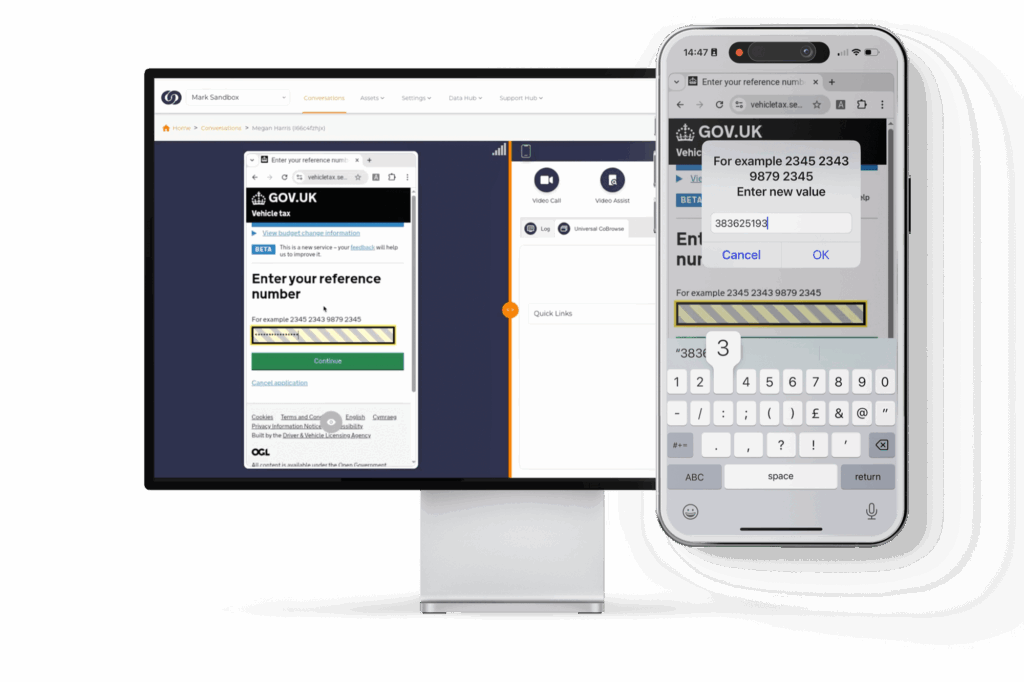
Cobrowsing lets an agent and customer look at the same browser journey at the same time. It is useful when the customer is stuck on a webpage, unsure which field to complete or struggling to move through a checkout, portal or application.
Instead of asking the customer to describe what they can see, the agent can guide the next step directly within the page. That keeps the conversation focused on the task, not a long back-and-forth about buttons, fields or error messages.
Universal CoBrowse is different from screen sharing. The agent does not need to see the customer’s full desktop, open apps or private tabs. The session is focused on the web journey being supported, which gives teams a more controlled way to help.
It is also different from VideoAssist. Cobrowsing is not for physical issues or camera-based support. It is for browser-based customer journeys where the problem is not what the customer can show, but what they are trying to complete online.
Unlike basic screen sharing, we offer secure and encrypted collaboration without downloads or data exposure. Customers and agents can connect instantly across devices and industries – without hassle or technical barriers.
How Cobrowsing with Grypp Works
Secure browser-based guidance, fast setup and public API support for existing contact center workflows.
Universal CoBrowse lets agents guide customers through a shared browser journey without asking them to download software or share their full screen.
The customer joins through their browser, and the agent can support them through webpages, forms, checkouts, account areas or portals in real time. It works across devices, so customers can get help on desktop, tablet or mobile without being moved into a separate meeting tool.
Grypp can be used on its own or connected into your existing support stack. The public API makes it easier to embed cobrowsing into current workflows, so agents can launch guided web sessions from the systems they already use.
That keeps cobrowsing practical for contact centers: fast to deploy, easy for agents to adopt and focused on helping customers complete the online task in front of them.
Cobrowsing That Drives Revenue and Delivers Value
Universal CoBrowse helps agents guide customers through the online moments that affect conversion, resolution and customer confidence. From form fills to checkout support, agents can step in while the customer is still active in the journey.
Our customers are already achieving impressive results, including:
Faster resolution
Reduce back-and-forth when agents can guide customers through forms, portals and account journeys in real time.
Boost in conversations via guided basket builds, collaborative form fills, and visual upsell/cross-sell opportunities
Better customer clarity
Reduce friction by showing customers where to click, what to complete and how to move through complex web tasks.
Agent adoption in one week, helping teams move quickly from rollout to live support.

Why Grypp for Cobrowsing?
Grypp Universal CoBrowse is built specifcally for contact center support where the goal is not to see the customer’s full screen, but to help them move through a form, checkout, portal or account area safely.
It also sits inside Grypp’s wider Visual CX suite, that can be easily integrated within your systems. That means a cobrowsing session does not have to end when the task needs more than browser guidance. Agents can bring in video, document review, signatures or other visual support tools when the interaction needs them.
Using Grypp means fewer broken handoffs, less explaining and more customers completing the task while they are still in the session.
- Scriptless cobrowsing across supported websites and online flows
- Save and resume sessions when a customer needs to return later
- Conversion tracking on agent-led cobrowsing sessions
- Secure role-based access & real-time authentication
- Works across any site or journey without customer installation
- Easily integrated with other visual tools such as video, docs, and payments
Unlock Seamless and Secure Cobrowsing with Grypp
- Co-Browse any website in real-time, with no installations or downloads required
- Easily navigate and complete online forms collaboratively, reducing customer friction
- Works across all devices using Grypp’s secure virtual browser - no dependency on customer hardware or browser limitations
- Automatically masks sensitive data to ensure customer privacy
- Monitor the customer journey and provide post-session insights with page recording
- Track conversions and measure ROI directly from agent-led sessions
- Increased security with built-in session authentication and role-based access
- Seamlessly support customers through complex online processes such as applications, checkouts, or account setups
- Effortlessly deploy across teams with fully cloud-based scalable architecture
- Enable agents to save sessions for later, perfect for basket completion or abandoned journeys, and improving your conversion rates
A Cobrowsing Solution for Every Industry
Create standout customer journeys for any industry with secure and seamless co-browsing support.
Banking
Streamline account management, transactions, and loan and mortgage applications with guided assistance backed by enterprise-grade security.
Healthcare
Help patients complete portal access, appointment forms, pre-visit details, invoice uploads and billing pages while keeping support focused on the online task.
Insurance
Expedite policy selection, claims processing, and document verification seamlessly, all while ensuring compliance with cybersecurity and communication protocols.
Property Management
Guide tenants, residents and applicants through rent portals, lease documents, maintenance request forms, deposit steps and online account setup.
Retail
Help customers compare products, complete checkout, start returns, review warranty steps and resolve account issues while they stay on your site.
Technology & SaaS
Guide users through sign-up, onboarding, admin settings, billing pages and setup screens when written instructions are not enough.
Telecoms
Help customers compare plans, complete upgrades, update account details and understand billing pages while they stay inside the online flow.
Travel & Hospitality
Transform the booking process and simplify reservations with seamless screen sharing to increase upgrades, excursions, and travel packages.
Utilities
Guide customers through tariff selection, payment plans, billing queries, move-home forms and online service requests without exposing their full screen.
Cobrowsing Software FAQs
What is cobrowsing?
When a customer is stuck on a website, an agent can join the same browser session and guide the next step. They are not seeing the customer’s whole desktop. They are helping with the specific page, form, checkout or portal the customer is trying to use.
What does cobrowsing software help with?
It is most useful when a customer is already online but cannot complete the task alone. That might be an application, payment step, checkout, account update, claim form, booking change or service portal. Instead of sending written instructions, the agent can guide the customer while the page is still open.
How does Grypp Universal Co-Browse work?
The agent starts a secure session and the customer joins through their browser. There is no download, no meeting tool and no need to share the full screen. Once connected, the agent can help the customer understand fields, buttons, errors and next steps in real time.
What’s the difference between screen sharing and cobrowsing?
Screen sharing can show everything on the customer’s screen, including private tabs, apps, notifications and files. Cobrowsing is more focused. It allows agents and customers to view and interact on a shared website in real time, without exposing unrelated tabs, apps, or private information. Remember that basic screen-sharing can show the entire screen, including all open windows, which can create privacy and security risks.
Does cobrowsing show the customer's full screen?
No. The agent is there to help with the browser-based task, not view the customer’s whole device. That helps reduce unnecessary privacy exposure and keeps the support session focused on the page the customer needs help completing.
Does cobrowsing require a download or app installation?
No, Grypp’s cobrowsing solution does not require any downloads or installations. Sessions launch instantly within the browser, allowing customers to connect without technical barriers or friction.
Is cobrowsing secure?
Yes, a cobrowsing session is highly secure as it limits access to only the shared web page, it masks sensitive fields (like payment card information) and requires customer permission before a session begins. With sensitive data masking, role-based access and session authentication, customers never expose more information than needed.
Is Grypp’s co-browsing PCI and HIPAA compliant?
Yes, Grypp’s co-browsing solution is fully PCI DSS and HIPAA compliant, ensuring secure handling of payment data and personal health information during visual support and sales interactions.
Can agents cobrowse any website?
Yes. Universal CoBrowse is designed to work across any website in real time. That makes it useful when customers need help across forms, checkouts, applications, account areas, portals or other online flows that do not fit neatly into one pre-built support path.
Can cobrowsing help with online forms?
Yes. This is one of the clearest use cases. If a customer is unsure what a field means, misses a required step or gets blocked by an error, the agent can guide them through the form while they are still on the page.
Can cobrowsing help with checkout and conversion?
Yes, especially when a customer is interested but hesitates before completing the next step. An agent can guide checkout issues, basket changes, product comparisons or application steps while the customer is still active on the site.
Can cobrowsing reduce repeat contacts?
It can help where repeat contacts happen because the first interaction only explained what to do instead of helping the customer actually do it. If the task is completed during the session, there is less chance of the customer leaving confused and coming back later.
What information can be hidden during a cobrowsing session?
Sensitive fields can be masked so agents do not see information they do not need. That can include payment details, health information, identity fields, account data or other private information. The aim is to guide the task without giving the agent unnecessary visibility.
Can cobrowsing sessions be saved or resumed?
Yes. Grypp supports save and resume, which helps when a customer cannot finish an online task in one sitting. Instead of starting again from the beginning, the session can continue from the right point later.
How is cobrowsing different from VideoAssist or VideoCall?
Cobrowsing is for guided support inside websites, forms, checkouts and portals. VideoAssist is used when the agent needs to see a physical issue through the customer’s camera. VideoCall & ScreenShare is for live video conversations or broader screen-based support. Cobrowsing is the focused option when the customer is working inside a web page.